Back to Products
Nobikko app icon

Nobikko
のびのび成長記録

Watch your child grow — for years, with peace of mind.

Record height, weight and head circumference, and see them on a growth chart with percentile bands and SD scores. Built for the years after the newborn diary — from baby to junior high. Your records stay on your device — no cloud sync, no server. Free: no ads, no account.

iOSiPadOSAndroidOut now on the App Store and Google Play
¥0every feature free — no ads, no in-app purchases
0NDLab servers holding your child's records
2growth references, chosen per child: JSPE 2000 & CDC 2000
10 secto log a measurement, one-handed
How it works

From checkup to growth chart in three steps

No sign-up and no account. Add your child and record the first measurement the moment the app opens.

1

Add your child

A name or nickname, birth date and sex. Optionally the weeks of gestation for a preterm baby, and which growth reference to compare with.

2

Log a measurement

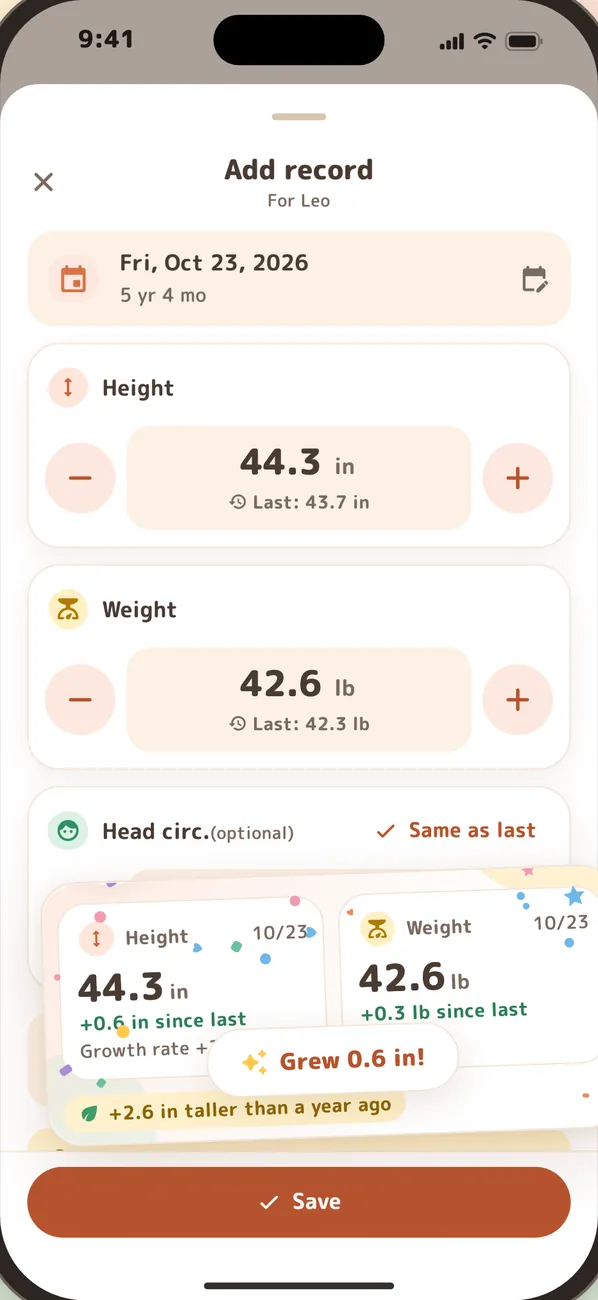
Height, weight and, if you like, head circumference. Big plus and minus buttons start from the last value, so a checkup takes seconds.

3

See the curve

Each record lands on the growth chart, with the SD score or percentile and the growth since last time — calculated on your device.

Growth chart

Where they are on the curve, at a glance

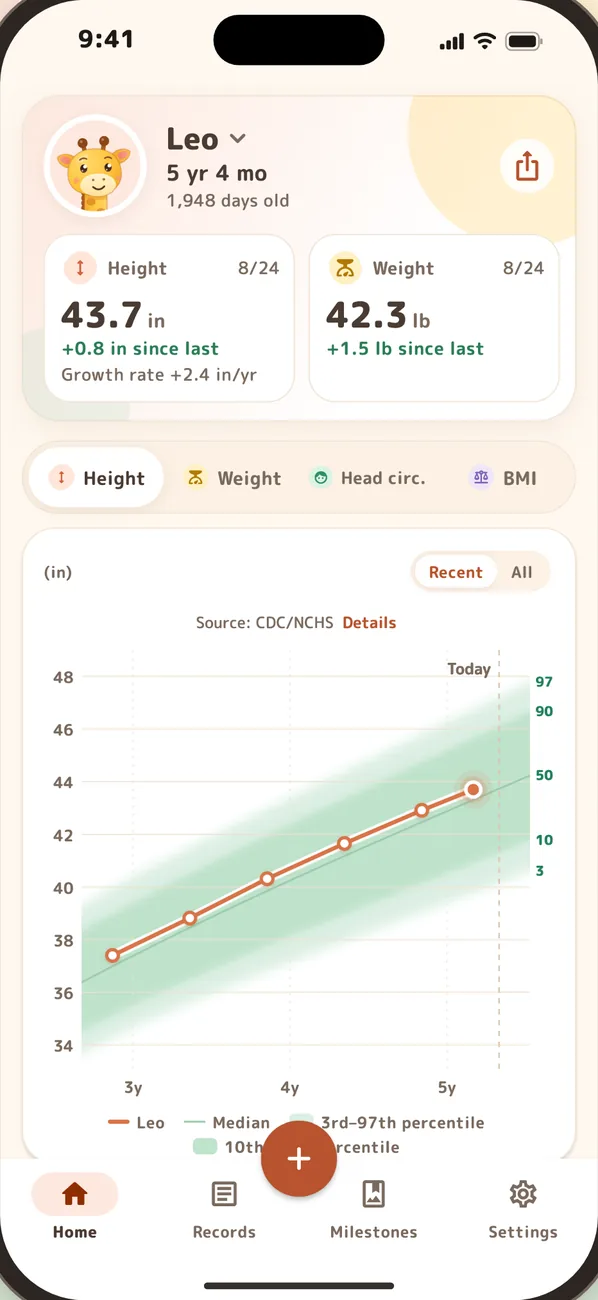
Nobikko plots every record on a clear growth chart with the reference range softly shaded, in cm/kg or in/lb. Percentiles and SD scores are worked out on your device each time they are shown — never stored, never sent.

  • Percentile and SD score, plus growth per year
  • Corrected age for babies born before 37 weeks, up to 24 months
  • Target-height estimate from parents' heights — a statistical guide only
Growth chart with the child's height plotted over percentile bands
Backup & moving

Keep every record — on your device, not our server

Growth records are years of memories, so Nobikko keeps them on your device, where the system's own backup already covers them. NDLab runs no server for the app and never sees your child's data.

  • iPhone & iPad — records and photos are included in iCloud Backup (or a computer backup) and come back on your next iPhone
  • Android — records stay on the device, are included in Android's own device backup when it's on, and can be exported as a JSON file
  • JSON backup & restore to move between iPhone and Android
Backup and export settings: on-device storage, JSON export and import, PDF and CSV
Checkups & family

Ready for the pediatrician, easy to share with grandparents

Bring a tidy PDF with charts and records to the next checkup, send a growth card to the family, and keep siblings side by side. Everything is created on your device and leaves it only when you share it.

  • PDF for checkups and CSV for spreadsheets
  • Growth card — a shareable image of the latest height and weight
  • Multiple children — sibling comparison and whole-family entry after a checkup
And more

Small touches for busy parents

Reminders

weekly or monthly local notifications to measure again

Milestones

first steps, first day of school — with photos kept on your device

App Lock

Face ID, fingerprint or passcode, handled by the system

Home-Screen Widget

the latest height and weight, hidden while app lock is on

No Account, No Ads

no sign-up, no analytics, no tracking

Growth references

Published references, credited

Each child is compared with one published reference that you choose. Outside its published age range Nobikko shows nothing rather than guessing — for example, the Japanese head-circumference reference ends at 6 years 3 months.

Japan — JSPE 2000

Year-2000 reference values of the Japanese Society for Pediatric Endocrinology (JSPE) and the Japanese Society for Auxology (LMS method), based on Japan's 2000 national growth surveys. Shown as SD scores.

United States — CDC 2000

CDC 2000 Growth Charts (LMS parameters). Source: CDC/NCHS. Shown as percentiles. Use of CDC/NCHS data does not imply endorsement of this app by CDC, NCHS or the U.S. Department of Health and Human Services.

A record-keeping tool, not a medical device. Nobikko shows where a measurement sits relative to the selected reference. It does not diagnose, treat, cure or prevent any medical condition, and the target height is a statistical estimate only. Please consult your pediatrician or another healthcare professional about any concerns.
FAQ

Questions, answered

Is my child's data uploaded anywhere?
Not to us. NDLab runs no server for Nobikko and never receives your child's records. They are stored on your device; the app has no cloud sync on iPhone, iPad or Android. They are included in the system's own device backup when that is on (iCloud Backup on iPhone / iPad, Android's Backup to your Google Account), and you can export them as a JSON file. Photos stay inside the app on the device. There are no ads, no analytics and no tracking. The full details are in the privacy policy.
Which growth references does Nobikko use?
You choose one per child: the Japanese year-2000 reference values of the Japanese Society for Pediatric Endocrinology (JSPE) and the Japanese Society for Auxology (LMS method), or the CDC 2000 growth charts (Source: CDC/NCHS). Outside a reference's published age range, Nobikko shows nothing rather than guessing. Use of CDC/NCHS data does not imply endorsement of the app by CDC, NCHS or HHS.
Can Nobikko tell me whether my child's growth is normal?
No. Nobikko is a record-keeping tool, not a medical device, and it does not diagnose any condition. It only shows where a measurement sits relative to the selected reference, as an SD score or percentile; the target height is a statistical estimate. Please consult your pediatrician about any concerns.
Is Nobikko free?
Yes. In the current version every feature is free — multiple children, PDF and CSV export, milestones and photos included. There are no ads, no in-app purchases and no subscription.
What happens to my records when I switch phones?
iPhone to iPhone: set up the new iPhone from an iCloud (or computer) backup, or move with Quick Start. Android to Android: if Android's Backup is on, your records come back when you set up the new phone with the same Google Account; you can also move them with a JSON file. Between iPhone and Android, export a JSON file in Settings and import it on the new phone — the app keeps an automatic backup of the current data before every import. JSON files and Android's cloud backup don't include milestone photos; pick them again from your photo library on the new phone (an iPhone backup or a direct device-to-device transfer carries them).

Their growth, safe in your own hands.

Free on the App Store and Google Play.

Download on theApp Store Get it onGoogle Play